AI video creation for faceless reels and social content
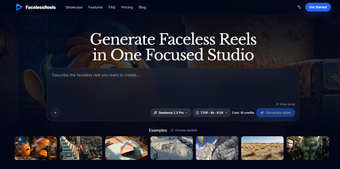
FacelessReels is a premium AI video generator for making short-form content without putting yourself on camera. Designed for creators, marketers, and hobbyists, the app brings the planning and production side of faceless reels into one place, so you can go from an idea to a video for social media platforms.
More importantly, FacelessReels is built around a repeatable workflow rather than just generating a clip and leaving you to figure out the rest. Much like InVideo, it keeps the process moving from the initial concept through creation and, where supported, publishing without rebuilding the whole process each time.
From content idea to finished reel
When you already know what you want to say, FacelessReels gives you a place to work out the rest. You can start with a topic, shape the hook and script, then map out scenes and caption beats before generating the video. That makes it useful for repeat content, especially when you want a faceless format without juggling separate tools for planning, prompts, and video creation.
When it comes to actually making the video, you can turn text into scene prompts and control details, such as motion, framing, lighting, and mood. If you already have a storyboard frame or reference image, image-to-video can animate it instead. You can also switch between supported AI video models, then set the resolution, duration, and frame format to suit the intended platform.
After that, the workflow goes beyond a single video. Six reusable templates give you starting points for new reels, while the series tools let you plan episodes, review them, and apply shared settings before generating. You can preview and download finished videos, then publish or schedule them to connected channels. That said, TikTok publishing isn’t available yet, and social publishing requires a Creator or Studio plan.
Made for short-form production
Ultimately, FacelessReels makes the most sense if you regularly produce short-form content and want planning, AI video generation, and publishing handled in one place. The text-to-video and image-to-video options give you different ways to start, while templates and series tools help with repeat production. It is less about replacing every part of video creation and more about giving faceless content a workflow you can keep using.